Shopify dropshipping software is the stack of apps and workflows used to run a dropshipping store on Shopify: product data, supplier orders, payments, email, reviews, analytics and customer service. For high-ticket stores, I’d rather use 6–10 reliable tools than 25 cheap apps that break margin.
I’m Lex, founder of Dropship Circle. I’ve tracked £8.25M in sales across our own and our students’ and clients’ UK high-ticket stores, and I’m not interested in the guru version of this topic where a £19 app supposedly builds a business for you.
Software matters. But it does not replace supplier relationships, margin control, cashflow management, proper merchandising, or knowing why someone would buy a £1,200 product from you instead of a marketplace. The right stack makes a good operation cleaner. The wrong stack makes a weak operation noisier.
What is Shopify dropshipping software?
Shopify dropshipping software connects your store, suppliers, customers and back-office process into one operating flow.
At the basic level, this might mean an app that imports products, pushes orders to a supplier and updates tracking. At the serious level, it includes your product information, checkout, email flows, finance tracking, customer service, supplier communication and reporting.
For a low-ticket store selling a £14 gadget, people obsess over automation because each order is tiny. For a high-ticket store selling, say, a £1,200 sauna, garden room, mobility chair, commercial appliance or specialist furniture item, the software job changes. You need fewer orders, better margin control, cleaner supplier handling and less chaos when the customer asks a real pre-sale question.
That is why I do not treat Shopify dropshipping software as one magic app. I treat it as an operating system made of specific parts:
Shopify for the storefront and checkout
Supplier files or portals for product data and stock
Email/SMS for abandoned carts and post-purchase communication
Helpdesk for customer conversations
Reviews and trust assets
Analytics for where cash is leaking
Finance tracking for VAT, refunds, payment holds and advertising spend
The software is there to reduce friction. It is not there to save a bad niche, bad supplier deal or bad offer.
What Shopify dropshipping software do you actually need first?
Most new stores need Shopify, a product data workflow, email, analytics and customer support before fancy automation.
If you are starting, the mistake is buying too many apps before you know the job they are meant to do. I’ve seen operators spend £200–£500 per month on tools while they still cannot explain their gross margin, delivery promise or returns process.
A sensible starting stack looks like this:
Job | Tool type | Named examples | Why it matters | Typical trade-off |
|---|---|---|---|---|
Storefront and checkout | Ecommerce platform | Shopify | Core site, checkout, orders, payments | Easy to start, but app costs creep up |
Product data | Import/CSV/PIM workflow | Matrixify, supplier CSV, manual Shopify import | Keeps titles, specs, prices and variants organised | Manual work is slower but safer early on |
Email marketing | Email platform | Klaviyo, Shopify Email | Recovers carts, follows up enquiries, builds trust | Powerful tools need proper setup |
Customer support | Helpdesk | Gorgias, Zendesk, Freshdesk | Stops inbox chaos as enquiries rise | Another monthly cost if too early |
Analytics | Reporting | Shopify reports, GA4, Triple Whale | Shows traffic, conversion and spend leaks | Attribution is never perfect |
Reviews/trust | Review app | Judge.me, Reviews.io, Trustpilot | Adds proof where buyers hesitate | Fake-looking reviews damage trust |
If you only have a handful of products and no sales yet, you do not need a huge automation system. You need a clean catalogue, clear supplier terms, working checkout, proper enquiry handling and the ability to see whether your numbers make sense.
The boring stack wins early. A good product page with accurate specifications, clear delivery information and a fast response to a buyer’s question can outperform a bloated site with 40 apps and no operational control.
What is the best Shopify dropshipping software for high-ticket products?
The best high-ticket stack prioritises supplier accuracy, buyer trust, margin visibility and human-assisted sales.

This is where most SaaS blogs go thin. They list the same dropshipping apps as if a £20 phone case and a £2,000 home improvement product need the same operating model. They do not.
With high-ticket ecommerce, the software has to support a different set of realities:
Customers ask more questions before buying
Suppliers may use trade price lists rather than slick public feeds
Delivery can involve pallets, booked slots or specialist couriers
Stock accuracy matters because refunds are painful
Payment holds can create cashflow pressure
Returns are not cheap
One order can be worth protecting properly
Here is how I’d compare the common software categories:
Software category | Best for | Weakness | High-ticket view |
|---|---|---|---|
Auto-import marketplace apps | Quick catalogue building | Often encourages product chasing | Useful only if supplier quality is there |
Supplier CSV/manual import | Accurate local supplier data | More manual work | Often better for UK/US supplier models |
Helpdesk software | Managing pre-sale questions | Cost before volume | Important once enquiries hit daily level |
Email automation | Cart recovery and trust building | Poor flows feel spammy | Valuable when purchase decisions take days |
Review platforms | Proof and credibility | Can look weak if underused | Strong trust layer for expensive products |
Analytics tools | Spend and funnel visibility | Attribution disputes | Needed before scaling paid traffic |
For the UK and US supplier model I teach inside Dropship Circle, the software should help you sell real products with real buyer demand from local suppliers. That is a different game to chasing Chinese import products with slow shipping, thin margins and disposable positioning.
The important decision is not “which app has the most features?” It is “which tool reduces the highest-cost mistake in this business?” If stock errors are costing you refunds, fix product data. If buyers are asking the same 10 questions, fix pages and support. If abandoned carts are high on £900 products, fix trust and follow-up.
Should you use automated product import apps or manual supplier workflows?
Use automation for repeatable data jobs, but keep manual control where price, stock and delivery errors are expensive.
Automated import apps look attractive because they promise speed. Press a button, import 500 products, connect a supplier and move on. That sounds efficient until you realise 500 weak products create 500 opportunities for bad titles, missing specs, wrong delivery times and no differentiation.
In high-ticket, I prefer a slower and cleaner approach at the beginning. If you are listing a £1,500 item, the product page needs proper dimensions, installation notes, delivery expectations, warranty details and reasons to buy from your store. An automated title and three supplier images are usually not enough.
A practical workflow might look like this:
Get the supplier price list or portal access.
Select 20–50 products that match demand and margin logic.
Build product pages manually or via structured CSV.
Add delivery, warranty and specification blocks.
Check live pricing against your target margin.
Confirm supplier stock and fulfilment process.
Only then automate updates where possible.
Tools like Matrixify can be useful because they help you manage Shopify data in bulk without blindly importing rubbish. Supplier portals can also be useful if they are reliable. But I would rather manually control 30 serious products than auto-import 3,000 products nobody should buy.
The trade-off is time. Manual work can take days or weeks. But a catalogue that has been thought through properly is an asset. A bloated catalogue is a liability dressed up as progress.
How much does Shopify dropshipping software cost?
A lean Shopify dropshipping software stack can start under £100 monthly, but serious stores often spend more as volume grows.
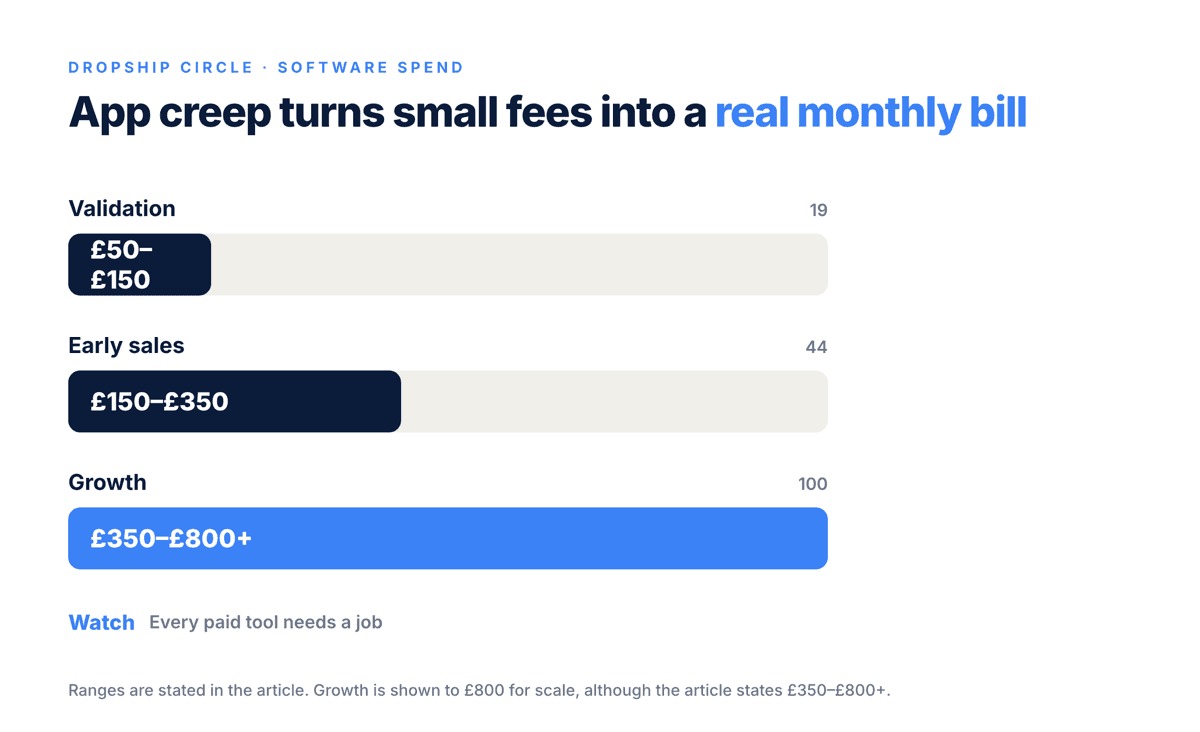
The cost question matters because app creep is real. Shopify makes it easy to add tools, and every tool feels small on its own. £19 here, £39 there, £79 for reporting, £49 for reviews, another £30 for support. Suddenly the store needs profit just to pay for unused software.
Here is an illustrative monthly cost view:
Stage | Likely tools | Example monthly software spend | What to watch |
|---|---|---|---|
Validation | Shopify, basic email, simple reviews | £50–£150 | Do not overbuild before proof |
Early sales | Shopify, Klaviyo, reviews, basic helpdesk | £150–£350 | Make sure each app has a job |
Growth | Helpdesk, analytics, finance tools, better CRO tools | £350–£800+ | Software must save time or improve decisions |
Established operation | Deeper reporting, support, inventory workflows, testing tools | £800+ | Complexity needs management |
These are not guarantees or fixed rules. They are a realistic way to think about cost. A store doing no meaningful sales does not need an enterprise stack. A store handling daily enquiries and supplier coordination probably cannot run forever from a Gmail inbox and hope.
My rule is simple: every paid tool needs to justify itself in one of four ways:
It saves time on a repeated task
It reduces costly errors
It improves buyer trust or conversion
It gives clearer numbers for decisions
If a tool does none of those, it is decoration. Decoration is expensive when you are still trying to prove the model.
Which Shopify apps matter most for conversion?
Conversion apps matter less than trust, offer clarity and product-page quality, especially above £500 order values.
A lot of operators want the magic conversion app. The truth is more awkward. If a buyer is considering a £1,200 purchase, a spinning discount wheel is not the main issue. They want to know if you are legitimate, whether the product fits their need, when it arrives, what happens if something goes wrong and why your store deserves the order.
The software that helps conversion usually supports those questions:
Reviews: Judge.me, Reviews.io or Trustpilot for visible proof
Email: Klaviyo or Shopify Email for abandoned carts and education
Live chat/helpdesk: Gorgias, Zendesk or Shopify Inbox for buyer questions
Page building: Shopify sections, Replo or PageFly if you need richer layouts
Analytics: GA4, Shopify reports or Triple Whale to find weak steps
But do not confuse installation with implementation. Installing Klaviyo does nothing if your abandoned cart email is a lazy “complete your order” message. Installing a reviews app does nothing if it has no credible reviews or looks like a template. Installing live chat can damage trust if nobody answers.
For high-ticket stores, I care about:
Delivery clarity above the fold
Phone number or clear contact route where appropriate
Proper specifications and measurements
Real warranty and returns wording
Supplier/category expertise shown on the page
Cart and checkout with no silly surprises
A £900 product page should not look like it was built in 11 minutes from a supplier feed. Software can display trust. It cannot fake substance for long.
Can Shopify dropshipping software automate supplier orders?
Yes, some tools automate supplier orders, but high-ticket stores often need approval steps before fulfilment.
Automation sounds brilliant until an incorrect £1,800 order goes to the wrong supplier, with the wrong delivery address or an unavailable item. That is why I like controlled automation rather than blind automation.
For lower-ticket products, automated order forwarding can make sense. The risk per order is smaller, the product is simpler and the delivery process is usually standard. For high-ticket products, I prefer an operational checkpoint before the supplier acts.
A sensible fulfilment flow is:
Customer places the order in Shopify.
Payment and fraud checks are reviewed.
Product, variant, address and delivery notes are checked.
Supplier stock is confirmed if needed.
Order is sent to supplier via portal, email, CSV or integrated app.
Tracking or delivery confirmation is added back to Shopify.
Customer gets proactive updates.
Tools can help with parts of this. Shopify Flow can automate internal notifications. Helpdesks can tag order issues. Supplier portals can reduce admin. Zapier or Make can move data between systems. But I would not remove human judgement from expensive, complex orders too early.
The trade-off is speed versus control. A 30-second automation feels efficient. A 10-minute review can prevent a £300 refund problem, a damaged supplier relationship or an angry customer who booked time off for a delivery that was never possible.
Is Shopify dropshipping software enough to build a profitable store?
No software can replace product selection, supplier access, positioning, cashflow control and consistent execution.
This is the blunt part. Most people do not fail because they picked the wrong review app. They fail because they choose weak products, copy other stores, ignore margin, never speak properly to suppliers and expect software to compensate.
A proper store needs decisions that software cannot make for you:
Which niche has real buyer demand?
Which suppliers are worth approaching?
What gross margin is acceptable after ads, refunds and payment fees?
What delivery promise can you honestly make?
What questions do customers ask before buying?
What makes your offer better than a generic marketplace listing?
This is why Dropship Circle is not built around Chinese import product chasing. We teach a UK and US supplier model focused on local suppliers, higher-ticket products and fewer sales with better margins. That does not make the work easy. It makes the business model more serious.
The DSC course was recently rebuilt and kept continuously up to date across all platforms because ecommerce education goes stale quickly if nobody maintains it. Supplier routes change. Buyer behaviour changes. Tools change. A serious programme has to keep pace with the actual model, not sell the same old screenshots forever.
Students also get an AI tool trained on 128 lessons inside the student system. It is there for support and structure, not as a magic shortcut. I see AI as useful for navigating material, structuring decisions and speeding up drafts. I do not see it as proof that your numbers, supplier deal or strategy are correct.
In real operations, confidence is not the same as correctness. Whether it is an AI answer, an app dashboard or a course seller’s claim, you still need to verify the numbers.
How should you choose your Shopify dropshipping software stack?
Choose software by bottleneck: catalogue, conversion, fulfilment, support, reporting or finance.
Do not build your stack from app-store popularity lists. Build it from the constraint in your store. A store with no traffic does not need advanced CRO software. A store with daily support tickets should not be run from memory. A store with supplier stock issues needs better data control before prettier pages.
Use this decision table:
Your bottleneck | What it looks like | Software to consider | What to fix first |
|---|---|---|---|
Catalogue chaos | Wrong specs, poor titles, bad variants | Matrixify, better CSV workflow | Product data structure |
Low trust | Traffic but few enquiries or sales | Reviews.io, Trustpilot, Judge.me | Proof, policies, page clarity |
Cart abandonment | Buyers add to cart then leave | Klaviyo, Shopify Email | Delivery, payment options, follow-up |
Support mess | Questions lost across email/social | Gorgias, Zendesk, Freshdesk | Ticket handling and templates |
Fulfilment errors | Wrong orders, stock surprises | Shopify Flow, supplier portal, Make | Approval workflow |
Unclear numbers | You cannot see profit leaks | Shopify reports, GA4, finance tracker | Margin and cashflow reporting |
I like asking one question before paying for a tool: “What mistake will this prevent, or what decision will it improve?” If the answer is vague, I do not buy it yet.
The best stack is usually built in phases:
Phase 1: Launch cleanly with Shopify, product data and basic email
Phase 2: Add trust, reviews and better support handling
Phase 3: Improve analytics, fulfilment workflows and finance visibility
Phase 4: Add deeper automation once the process is proven
This mirrors how durable products are built too. You rarely see the full vision in version one. You improve across generations instead of expecting v1 to be perfect. The same applies to your store stack.
What mistakes do operators make with Shopify dropshipping software?
The biggest mistake is using software to avoid hard commercial decisions.
Here are the common ones I see:
Buying apps before proving the niche
Importing hundreds of products with no margin logic
Letting automation publish poor product pages
Ignoring supplier delivery details
Relying on AI outputs without checking them
Tracking revenue but not profit
Adding discounts to fix a trust problem
Installing live chat and then not replying
Using US-focused advice without checking UK VAT, delivery and supplier realities
One specific mistake is obsessing over “winning product” software. That mindset usually leads to copying trends, chasing disposable products and competing with everyone else using the same data. In high-ticket ecommerce, I care more about supplier access, category understanding and buyer intent.
Another mistake is confusing dashboards with truth. Attribution tools can be useful, but they are not gospel. Payment processors, ad platforms, Shopify and analytics tools can all tell slightly different stories. If you are spending £100 a day on ads, you need to know what is actually happening to cash, not just what one dashboard claims.
My rule: software should expose reality, not hide it behind prettier graphs.
What Shopify dropshipping software stack would I start with today?
I’d start lean: Shopify, structured product data, email, reviews, support, analytics and a finance sheet.
If I were starting a serious high-ticket store today, I would not begin with 30 apps. I would start with the simplest stack that lets me sell properly and see the numbers.
My practical starting stack would be:
Function | Tool choice | Why I’d use it |
|---|---|---|
Store | Shopify | Reliable ecommerce base with strong app ecosystem |
Product data | Supplier CSV + Matrixify if needed | More control over specs, pricing and variants |
Klaviyo or Shopify Email | Cart recovery and buyer education | |
Reviews | Judge.me or Reviews.io | Trust layer without overcomplicating early setup |
Support | Shopify Inbox first, then Gorgias/Zendesk later | Do not overpay before ticket volume exists |
Analytics | Shopify reports + GA4 | Enough to spot early leaks |
Finance | Spreadsheet or accounting workflow | Keeps margin, VAT, refunds and fees visible |
The first target is not perfection. It is operational clarity. Can buyers understand the offer? Can you process orders without panic? Can you see if the numbers work? Can you speak to suppliers like a serious retailer rather than a product scraper?
Once volume grows, I would add better support tooling, stronger reporting and more automation. But only after the process is worth automating.
Most operators take months, not days, to build consistency, and it varies heavily by niche, budget, execution and supplier access. Anyone promising that software alone shortcuts that is selling convenience, not reality.
Key takeaways
Shopify dropshipping software is a stack, not one magic app: store, product data, email, support, reviews, analytics and finance.
For high-ticket products, supplier accuracy, trust and fulfilment control matter more than mass product importing.
A lean stack can start under £100 monthly, but app creep can quickly turn into £300–£800+ without clear value.
Automate repeatable tasks, but keep human approval around expensive orders, stock checks and delivery details.
Software will not fix weak products, poor supplier terms, bad margins or lazy product pages.
Related reading
How To Dropshipping On Shopify
The Smartest Online Business Model for 2026 (And Why High-Ticket Wins)
Frequently asked questions
What is the best Shopify dropshipping software?
There is no single best tool for every store. For high-ticket ecommerce, I’d usually start with Shopify, structured supplier data, email software like Klaviyo or Shopify Email, a review tool such as Judge.me or Reviews.io, and basic analytics. The best choice depends on your bottleneck.
Can you dropship on Shopify without apps?
Yes, you can run a basic dropshipping operation on Shopify without many apps, especially if you manually send orders to suppliers. But you will still need a reliable process for product data, order tracking, customer communication and finance. As volume grows, the right apps reduce errors and admin.
Is Shopify dropshipping software worth paying for?
It is worth paying for when it saves time, reduces mistakes, improves buyer trust or gives clearer numbers. It is not worth paying for if it only makes you feel busy. A £39 monthly app is cheap if it prevents fulfilment errors, but expensive if it does nothing useful.
Does dropshipping software automatically find winning products?
Some tools show trending products or marketplace data, but that is not the same as building a real store. In high-ticket ecommerce, supplier access, demand, margin, delivery and trust matter more than chasing whatever a software dashboard says is popular.
How many Shopify apps should a dropshipping store use?
Early on, I’d rather see 6–10 purposeful tools than 25 random apps. Start with the essentials: store, product data, email, reviews, support, analytics and finance tracking. Add more only when a real bottleneck appears.
If you want the model behind the software, supplier selection, high-ticket positioning, product pages, margins and the UK/US supplier route, watch the free Dropship Circle training. It will give you a clearer view of how I approach this properly, without pretending an app builds the business for you.
Ready to Build Your Ecommerce Business?
Get started with our free training and discover the exact framework we use to build sustainable high-ticket stores.
Related articles

Building Your Store
How To Dropshipping On Shopify
How to dropshipping on Shopify, step by step: suppliers, store build, shipping rates, margins and what sinks stores.

Building Your Store
Shopify Dropshipping Apps: What a Serious Store Actually Needs
Shopify dropshipping apps ranked by real use case, margin impact, supplier model and fulfilment risk.

Building Your Store
Shopify Dropshipping Platform
A blunt operator guide to using Shopify as a dropshipping platform for high-ticket UK and US ecommerce without guru.